 Circular Blend Curve overview
Circular Blend Curve overview
Circular Blend Curve overview
|
Overview |
Related Topics |
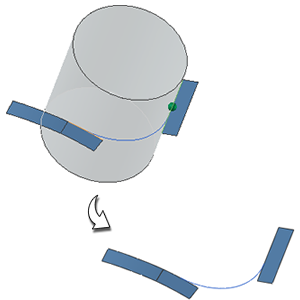
Use the Circular Blend Curve command to create a smooth, blended curve between two 3D curves or edge chains. The blend curve is tangent to the two input curves and looks like a circular fillet if projected onto a plane normal to the selected vector direction.
The following graphic shows the curve and optional cylinder during preview, and the output blend curve.
|
Application |
Modeling |
|
Toolbar |
Curve→Curve from Curves Drop-down→Circular Blend Curve |
|
Menu |
Insert→ Curve from Curves→ Circular Blend Curve |