|
Overview |
Options |
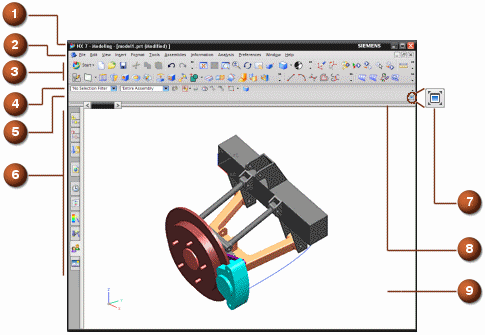
In standard display, the menus and toolbars are positioned at the top of the window and the Resource bar is to the left of the graphics window. This is the default display.
|
# |
Component |
Description |
|---|---|---|
|
|
Title bar |
Displays information for the current part file. |
|
|
Menu bar |
Displays menus with lists of commands. |
|
|
Toolbar area |
Displays active toolbars. |
|
|
Selection bar |
Sets selection options. |
|
|
Cue and Status line |
Prompts you for the next action that you need to take, and displays messages on functions and actions. |
|
|
Resource bar |
Contains tabs for navigators, browsers, and palettes. |
|
|
Full screen button |
Lets you switch between standard and full screen displays. |
|
|
Dialog Rail |
Positions dialog boxes. |
|
|
Graphics window |
Lets you create, display, and modify parts. |


